
Dreams Do Come True: Building a Knowledge Graph from the Inside Out
Discover how our Graphwise Smart Tags helps meaning travel across our enterprise systems and teams without losing context.

Main Takeaways
Managing files isn’t managing knowledge — Enterprises store thousands of documents, but the knowledge in them stays scattered, named inconsistently, and opaque to machines.
Meaning should be made explicit at creation — Instead of tagging after publication, Graphwise links content to shared graph concepts while it’s being written.
Smart Tags put the human at the source of the loop — Authors in Google Docs, Sheets, and Slides choose agreed concepts, with definitions and synonyms at hand, instead of free-text labels.
Tagged content builds the knowledge graph from the inside out — Every tagged document adds to the graph, supporting consistent discovery, reuse, and context for AI agents.
Opening my dog-eared copy of Weaving the Web, I turn to page 157 and find a passage I have returned to countless times over the years:
“I have a dream For the Web and it has two parts. In the first part the web becomes a much more powerful means for collaboration between people. […] Furthermore the dream of people-to-people communication through shared knowledge must be possible for groups of all sizes interacting electronically with as much ease as they do now in person. In the second part of the dream collaborations extend to computers. Machines become capable of analyzing all the data on the Web, the content, the links, the transactions between people and computers. “
Cit. Berners-Lee, T., & Fischetti, M. (1999). Weaving the Web: The Original Design and Ultimate Destiny of the World Wide Web by Its Inventor. Harper San Francisco. p. 157 (You can also enjoy more visionary thinking at Berners-Lee’s Conception of the Semantic Web 1999)
I have cited these words countless times in blog posts, teaching materials, and, more recently, in my PhD research. And these days, I have the privilege and pleasure to read them not only as someone inspired by this dream, but also as someone working with elements of it that have become reality.
The web of people and machines today and what does that have to do with tags
Today, sir Tim Berners-Lee’s dream is reality, a day-to-day existence for quite a lot of people. We can publish and access information from almost anywhere, collaborate across continents in real time, follow links from one idea to another, and build on knowledge.
The Semantic Web, too, despite all the skepticism, has moved beyond an idea into practical implementations. Think of Schema.org, Wikidata, Linked Open Data, and the many enterprise knowledge graphs built with semantic technology. They all embody the vision of turning information from a collection of isolated strings into an interconnected body of knowledge.
One of these enterprise knowledge graphs is our own Graphwise Knowledge Graph and the work we do with content. At the point of this writing, we, the Sales Enablement team at Graphwise, can happily say that we are creating content using inline tags from our graph, or — to borrow Google’s metaphor — we create content with words and things, not strings. And that content, together with the linked data is powered by, feeds a number of applications of our Graphwise Knowledge Graph, such as Theo (our documentation assistant ) or Marta (our marketing application through which you can talk to our content).
But what does it actually mean to write with things, not strings? Why would anyone want to do it, and what difference does it make to enterprise content and, increasingly, to the enterprise AI systems that work with that content?
Let’s start with the why.
Paving meaning and shared understanding
For a long time, content management was largely concerned with creating, storing, organizing and retrieving documents. We became very good at managing files. But managing files is not quite the same as managing the knowledge they contain. An enterprise may have thousands of documents, presentations, and spreadsheets.
And, we at Graphwise, are not an exception. So, what about the information buried in these piles of documents and presentations? How connected is it? Do the people consuming this information or using it into documents use the same terms to refer to the same things? And can they distinguish between concepts that happen to share a name, such as Paris the city and Paris, the celebrity? Also — the more pressing question these days — can a machine understand what a particular document is about beyond matching words?
All these questions boil down to one challenge: the challenge of disconnected knowledge.
Walking the paved path one tag at a time
Finding a way to meet that challenge is vital for efficient content management and knowledge discovery.
It is that way that we decided to take, building our Graphwise Knowledge Graph. Create content that adds to the coherence not the chaos of communication in the company.
By coherence here I do not simply mean using the same words everywhere. I mean making sure that the words we use refer to shared concepts. That those concepts have a recognizable place in a wider knowledge model. And that their relationships remain understandable as content moves between people, systems, and applications.
What is more, this coherence is not born out of post-factum actions of tagging. But rather in the very process of creating content. We don’t want to wait until content has been published, collected in repositories, or fed into AI systems to make its meaning explicit. We want to make meaning explicit as we create content. By connecting everyday working documents to shared graph concepts, we turn content production into an act of knowledge management and make the resulting knowledge reusable across Google Drive, the Graphwise Knowledge Graph, and AI agents.
That is the thinking behind our internal add-on and its design.
Enter Graphwise Smart Tags.
Graphwise Smart Tags: Writing our way towards a richer knowledge graph
Graphwise Smart Tags is our internal Google Workspace add-on that helps us walk the talk of knowledge management and semantic technologies directly into Google Docs, Sheets, and Slides.
The idea is straightforward: instead of treating a document as an isolated file and adding meaning somewhere further down the content lifecycle, we can connect it to our shared knowledge model while we are working on it.
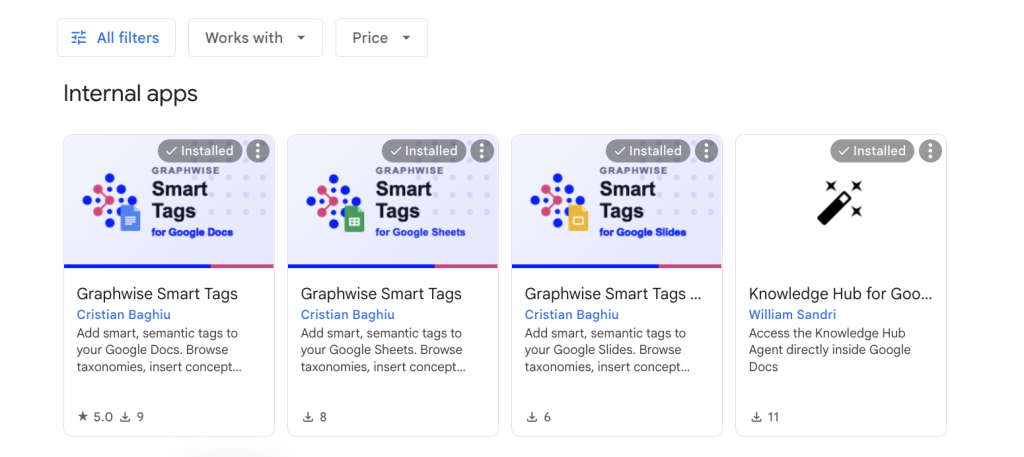
The add-on allows us to enrich documents, spreadsheets, and presentations with semantic tags linked to concepts from Graphwise Knowledge Graph taxonomies and ontologies.
We can browse hierarchical structures, select the concepts relevant to our content, and access contextual information such as definitions, descriptions, synonyms, and related terms.
This means that when we use a term such as GraphRAG, for example, we can associate it with the agreed concept in our knowledge model rather than relying on everyone to interpret the word in exactly the same way.
The same applies to the personas we use in Sales Enablement, our products terminology, industry concepts, and other entities that need to be represented consistently across our content.
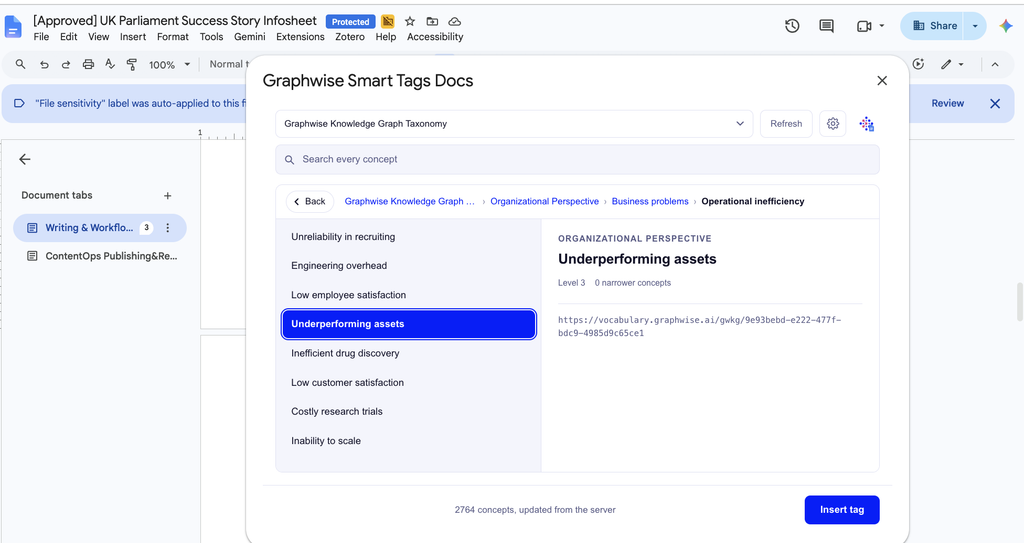
That’s human in the loop at the very source of the loop. In other words, next to our tooling, which allows for concept tagging, we add the human in the loop by allowing the writer or the editor to directly write a sentence using a tag.
Graphwise Smart Tags in action for Sales Enablement
Case in point, customer success stories, created as a Google Slides presentation.
It describes a customer, an industry, a business challenge, a Graphwise solution, and the outcomes achieved. The presentation is useful in its own right, but its value doesn’t have to stop there.
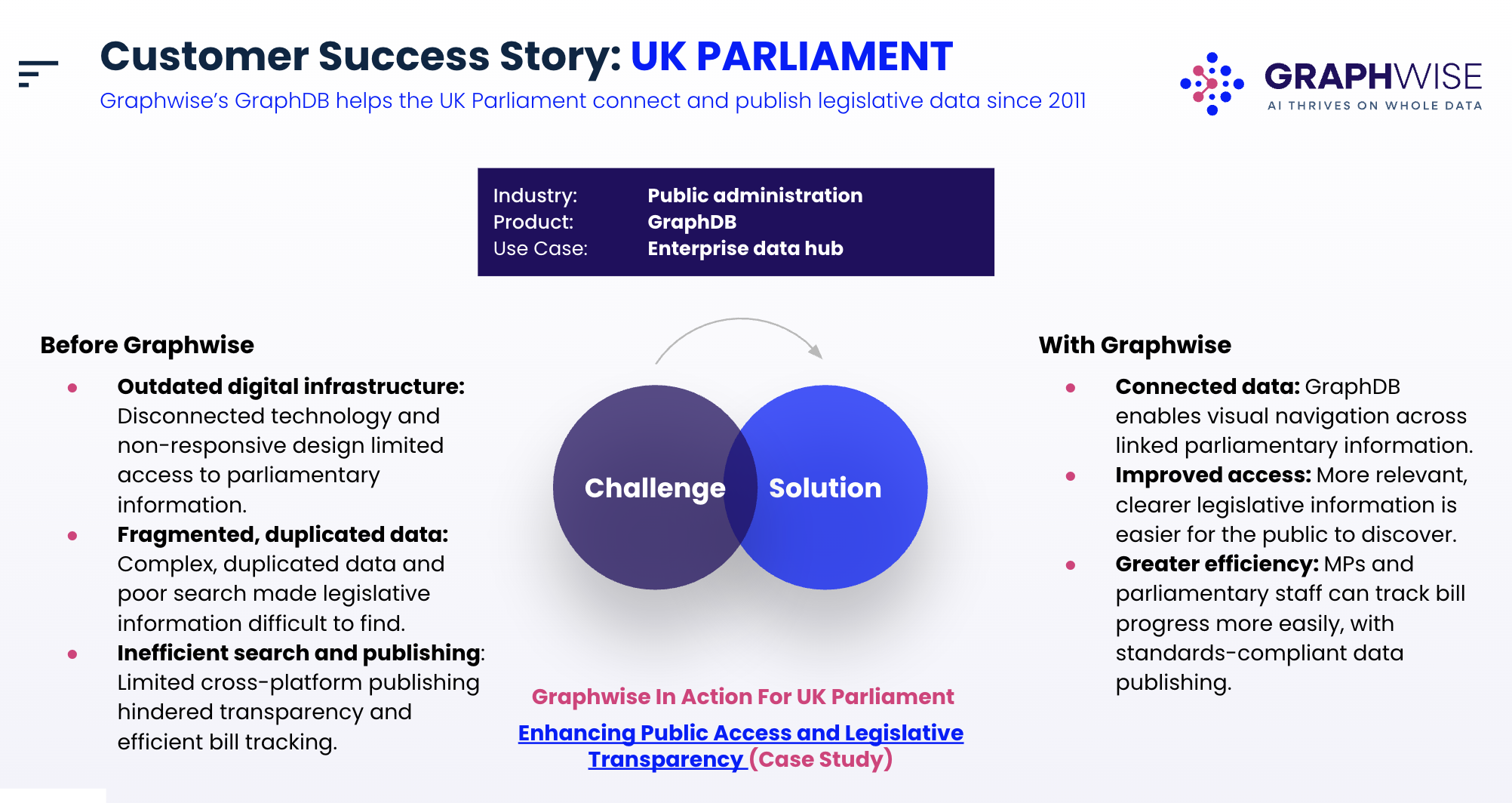
Using Graphwise Smart Tags, we associate the presentation with concepts from our Graphwise Knowledge Graph. The author of the content uses a tag that is a concept from our vocabularies instead of a word when writing down the relevant industry, customer profile, business challenge, solution capabilities, and other entities that help describe its content.
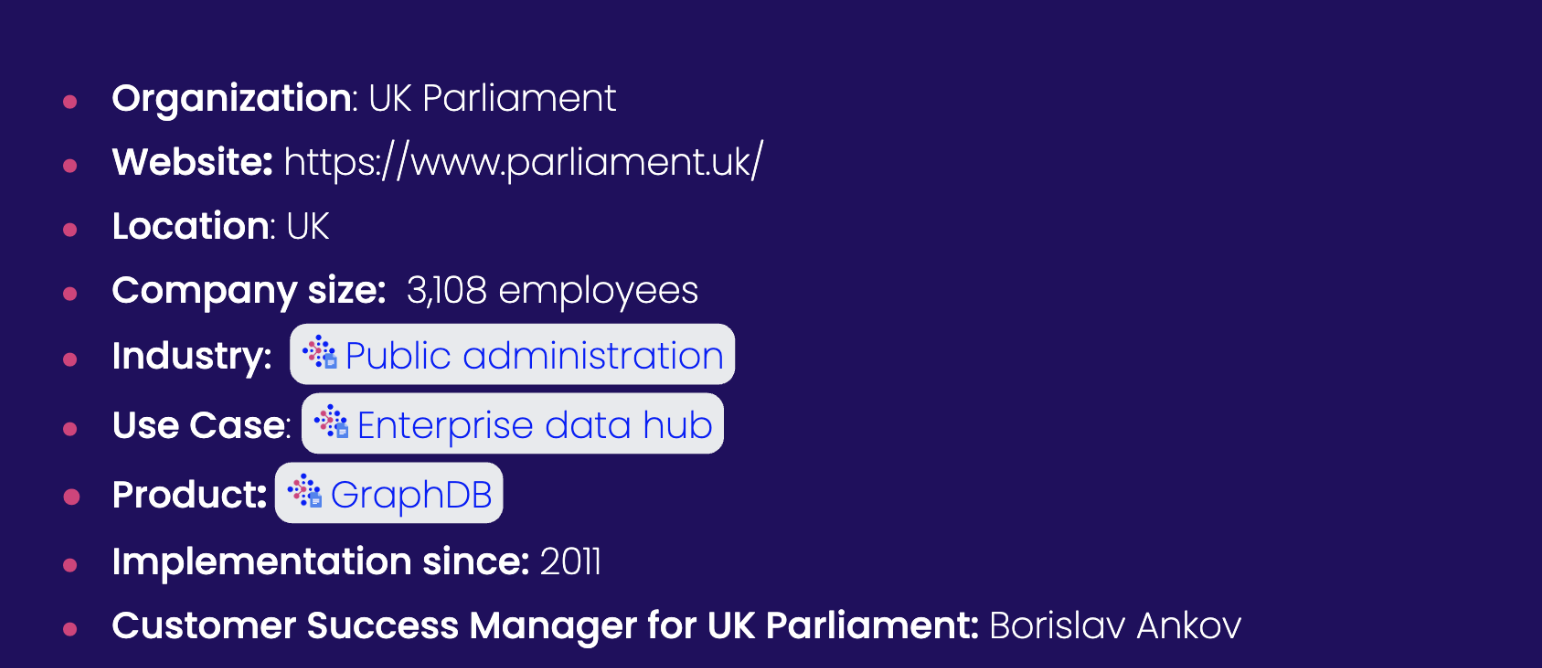
The concepts used are not arbitrary labels invented by the person creating the slides. They are concepts from the shared knowledge model.
The same concepts can be used to tag relevant content on our website and in other Sales Enablement materials. So, whether someone encounters the customer story as a presentation, a web page, or another piece of content, we have a consistent semantic reference point, the solid basis of a semantic backbone.
In a nutshell
Friends with benefits: writing our way towards a richer knowledge graph
When the content we create in Google Workspace is semantically enriched using concepts from our Graphwise Knowledge Graph, Google Drive becomes more than a place where documents happen to live. It becomes a source of structured, connected information.
The benefits of writing with Graphwise Smart Tags for us are many. Think about the journey:
- For AI agents and knowledge-intensive applications, this explicit context can become an additional source of meaning to draw upon, helping connect documents to the entities and relationships they describe.
- In Google Workspace, people create content and associate it with shared, agreed upon concepts.
- Through the Graphwise Knowledge Graph everyone writing content can look up for definitions, relationships, and the place of the concepts in the wider ecosystem of enterprise knowledge.
- Across the content ecosystem, the same concepts can support consistent tagging, discovery, and reuse.
Epilogue:
And just like that we now use content production to build the knowledge graph from the inside out, writing our way towards more efficient communication between stakeholders driven by shared understanding and consistent naming.
Text is created with Linked Data at its origin. We are bringing the human into the knowledge loop at the very source of the loop: where knowledge is first articulated, documented, and shared.
We are not just writing content and managing it afterwards. We are creating content that is connected to knowledge from the outset. We are making our own work more coherent, while contributing to the Graphwise Knowledge Graph, which helps power discovery, communication, and AI applications.
It’s a dream come true.
Want to dive deeper?
- The web of people and machines today and what does that have to do with tags
- Paving meaning and shared understanding
- Walking the paved path one tag at a time
- Graphwise Smart Tags: Writing our way towards a richer knowledge graph
- Graphwise Smart Tags in action for Sales Enablement
- In a nutshell
- Epilogue:
What Is Concept Tagging?
Graphwise combines large language models with knowledge graphs to automatically analyze text and understand what it actually means. By bridging human language with enterprise rules, it delivers automatic, context-aware, and auditable tags that stay accurate across all your company’s files.
Learn moreFAQ
Any Questions? Look Here
Keyword tagging attaches words or phrases found in content. It is simple, but can miss synonyms and confuse meanings. Knowledge graph concept tagging links content to defined entities or concepts. It adds context, relationships, hierarchy, and disambiguation. Therefore, it supports more consistent classification, richer search, and better analytics across systems.
Use a hybrid approach. Classify content automatically after it is written to scale tagging and keep categories consistent. Let authors add critical context during creation when needed. Provide human review for low-confidence or sensitive tags. Reprocess content when it changes. This balances speed, accuracy, and governance.
Yes. LLMs can auto-tag content against your taxonomy with strong, context-aware results. Accuracy improves when the taxonomy is well designed and combined with a knowledge graph, entity linking, and confidence thresholds. Use human review for uncertain or sensitive cases. Benchmark results on representative content and refine the model continuously.
Yes, in Microsoft 365, Graphwise can automatically add taxonomy tags to SharePoint and Teams content, with review and manual edits available. For Google Docs, a native direct-tagging option is not confirmed. Integration may require a custom connector or workflow.
Recommended Content
Search Documentation Smarter, Not Harder: Meet Theo, The Graphwise Help Search Agent
Read about Theo, the Graphwise’s AI-assisted help search agent and how it enables natural-language interaction with documentation through the Graphwise Knowledge Hub.
Read more
Beyond the Chatbot: Why Marta is the Smarter Way to Navigate Graphwise
Read about our AI assistant designed to give instant, contextually accurate answers about our products, use cases & business value.
Read more
Lessons Learned from Building an AI-ready Knowledge Hub
Read about how we reimagined content to deliver actionable, context-aware knowledge through the Graphwise Knowledge Hub.
Read more